-
Last Updated
2026-08-17 07:47:56
Google’s Private Hotline: 5 Strategic Secrets Hidden Inside Search Console
1. Introduction: The Blind Spot in Your SEO Strategy
In the world of digital growth, most marketers are flying blind. They rely on third-party tools and "best guess" estimations to measure SEO success, but they ignore the only source of absolute truth: the crawler itself. Google Search Console (GSC) is not just another reporting dashboard; it is a direct, first-party communication line between your website and Google. It is the only place where Google provides raw data on how it perceives, crawls, and indexes your content. As a strategist, if you aren't interrogating this data, you aren't doing SEO—you're just guessing.
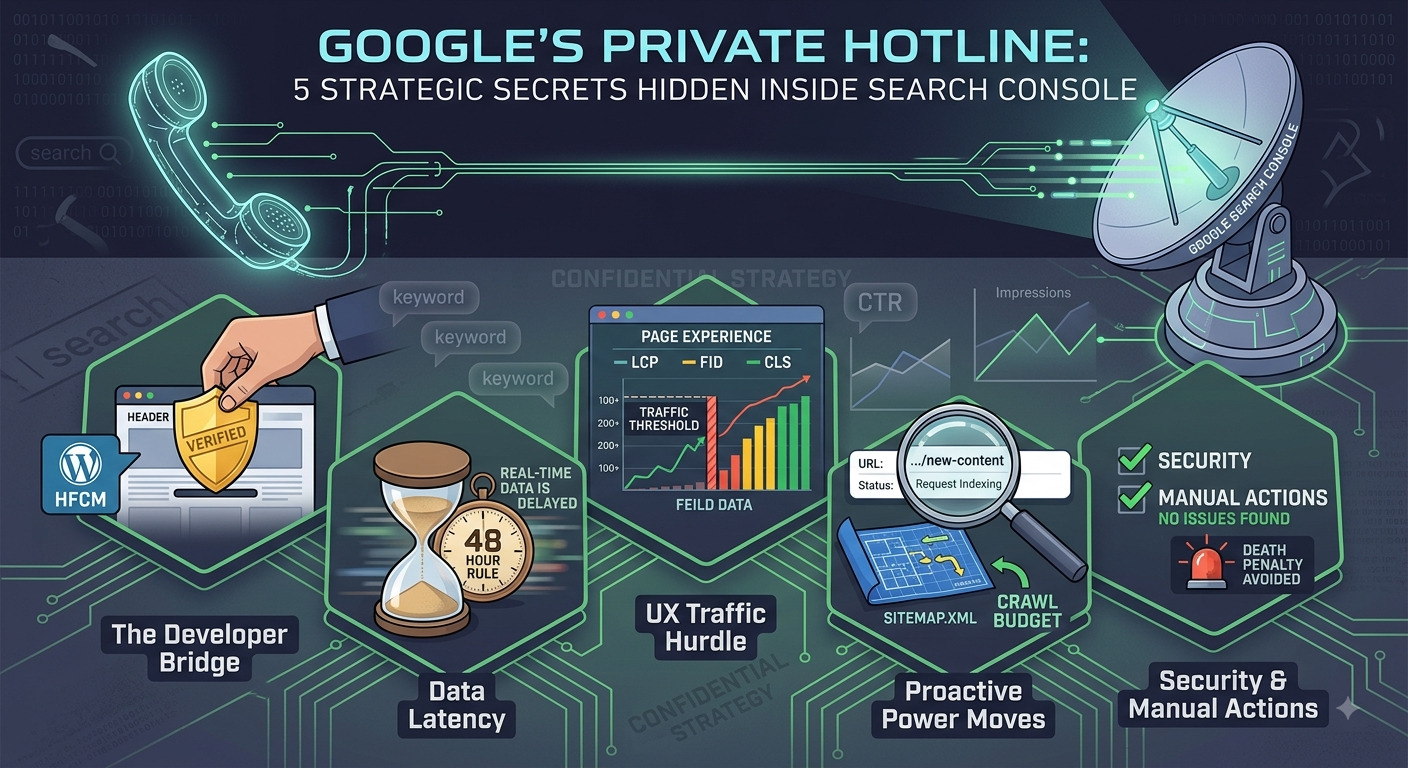
2. Proving You’re the Boss: The Developer Bridge
Before Google grants access to its "owner-level" data, you must provide explicit proof of ownership. This gatekeeping is essential because GSC reveals sensitive information that could be weaponized by competitors.
While the source outlines multiple verification methods—such as DNS records via your hosting provider, HTML file uploads, or Google Analytics integration—the HTML Tag remains the most popular for its simplicity.
"It is a simple, one-line meta-tag that you copy and paste into your website's header section."
The Senior Strategist’s Pro-Tip: While you can paste this code directly into the WordPress Theme File Editor, doing so is a rookie mistake. If you update your theme, you may lose the tag and your data access. Instead, use a plugin like HFCM (Header Footer Code Manager) to ensure the tag remains persistent. This technical bridge ensures that your "boss" status is never revoked during routine maintenance.
3. The "48-Hour Rule" and the Reality of Data Latency
In an era of instant gratification, GSC is a lesson in digital patience. Once verification is complete, the dashboard will not populate immediately. It requires a minimum of 48 hours for initial data to appear.
However, a senior analyst knows that the "48-hour rule" isn't just for setup. GSC data is almost always 2 to 3 days behind real-time. This latency is a technical requirement—Google must aggregate billions of interactions and process them through the Chrome User Experience Report (CrUX) before presenting them. This delay forces a shift from reactive "refresh-button" marketing to long-term trend analysis.
4. The Traffic Catch-22: Why Your UX Dashboard Might Be Empty
The "Page Experience" and "Core Web Vitals" sections are the holy grail for modern technical SEO, tracking metrics like LCP (Largest Contentful Paint), FID (First Input Delay), and CLS (Cumulative Layout Shift). But there is a hurdle: this data is earned, not given.
According to the source, Google requires a "considerable traffic" threshold to generate these reports. If your site doesn't see at least 100, 200, 300, or 400 visitors, these sections will remain empty. This creates a technical irony where you need traffic to get the data required to optimize for more traffic. This is because Google’s UX metrics are based on "field data" from real users; without a statistically significant sample size of visitors, Google simply won't have enough data to judge your site's performance.
5. Proactive Power Moves: URL Inspection and the Sitemap Blueprint
The URL Inspection Tool is your primary tool for "force-crawling." It allows you to see exactly if a page "is on Google" and, more importantly, gives you the power to "Request Indexing." This is a proactive tactical move—don't wait for the crawler to find your updates. Use this to push critical changes, such as price updates or emergency content corrections, directly to the index.
Furthermore, a site's health depends on the Sitemap. By submitting your sitemap.xml, you provide Google with a blueprint of your site's architecture. This ensures that the crawler doesn't just find a few pages by accident, but understands the relationship between all your pages, helping it navigate your "crawl budget" more efficiently.
6. When Google Talks Back: Security and the "Death Penalty"
The "Security & Manual Actions" section is the only part of GSC where you want to see nothing at all.
- Manual Actions: This is the "Death Penalty" of SEO. If Google’s human reviewers determine your site is utilizing "useless content" or engaging in spammy activities, they will manually de-index you.
- Security Issues: This is your silent guard, alerting you to hacks, malware, or encryption (SSL) failures.
If you find a notification here, your organic growth is effectively halted. "No news is good news" in this dashboard, but for the senior strategist, the Crawl Stats under the Settings menu offer one more layer of depth—allowing you to see exactly how many kilobytes the crawler is downloading and how much time it spends on your pages.
7. Conclusion: Beyond the Dashboard
Google Search Console transforms raw, intimidating crawl data into a strategic roadmap for growth. It moves you from a state of wondering to a state of knowing. It tells you which keywords are actually driving clicks, which countries your audience lives in, and exactly where your site's mobile experience is failing.
Now that you know Google is ready to tell you exactly what it thinks of your site, are you brave enough to look at the data?